Comment by shawnz
4 months ago
Why would you need to create a local account? You can just not choose to store the keys in your Microsoft account during BitLocker setup: https://www.diskpart.com/screenshot/en/others/windows-11/win...
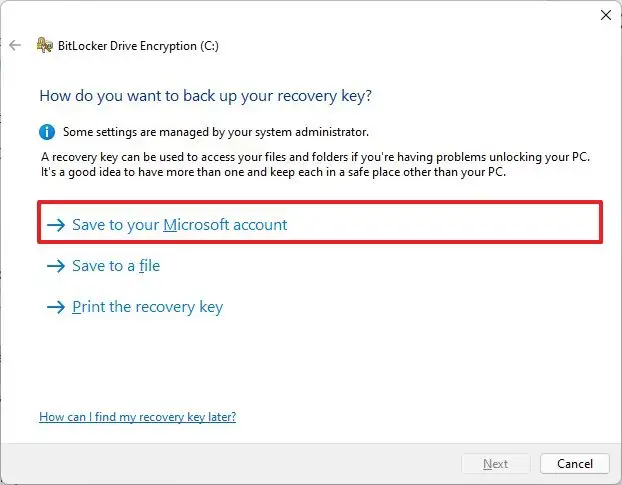
Admittedly, the risks of choosing this option are not clearly laid out, but the way you are framing it also isn't accurate
All "Global Reader" accounts have "microsoft.directory/bitlockerKeys/key/read" permission.
Whether you opt in, or not, if you connect your account to Microsoft, then they do have the ability fetch the bitlocker key, if the account is not local only. [0] Global Reader is builtin to everything +365.
[0] https://github.com/MicrosoftDocs/entra-docs/commit/2364d8da9...
They're Microsoft and it's Windows. They always have the ability to fetch the key.
The question is do they ever fetch and transmit it if you opt out?
The expected answer would be no. Has anyone shown otherwise? Because hypotheticals that they could are not useful.
> Because hypotheticals that they could are not useful.
Why? They are useful to me and I appreciate the hypotheticals because it highlights the gaps between "they can access my data and I trust them to do the right thing" and "they literally can't access my data so trust doesn't matter."
Considering all the shenanigans Microsoft has been up to with windows 11 and various privacy, advertising, etc. stuff?
Hell, all the times they keep enabling one drive despite it being really clear I don’t want it, and then uploading stuff to the cloud that I don’t want?
I have zero trust for Microsoft now, and not much better for them in the past either.
1 reply →
What do Entra role permissions have to do with Microsoft's ability to turn over data in its possession to law enforcement in response to a court order?
This is for the _ActiveDirectory_. If your machine is joined into a domain, the keys will be stored in the AD.
This does not apply to standalone devices. MS doesn't have a magic way to reach into your laptop and pluck the keys.
> MS doesn't have a magic way to reach into your laptop and pluck the keys.
Of course they do! They can just create a Windows Update that does it. They have full administrative access to every single PC running Windows in this way.
9 replies →
Furthermore it seems like it's specific to Azure AD, and I'm guessing it probably only has effect if you enable to option to back up the keys to AD in the first place, which is not mandatory
I'd be curious to see a conclusive piece of documentation about this, though
1 reply →
That's for Entra/AD, aka a workplace domain. Personal accounts are completely separate from this. (Microsoft don't have a AD relationship with your account; if anything, personal MS accounts reside in their own empty Entra forest)
They could also just push an update to change it anyways to grab it.
If you really don't trust Microsoft at all then don't use Windows.