Comment by rolfus
1 day ago
I made this thing [1] for us, it uses a cheap 10" e-paper display off aliexpress, an ESP32 and a couple of I2C sensors. The case is 3D-printed. It runs on two 18650 batteries, and all in all it cost less than 100$. The OpenWeather API is free for personal use.
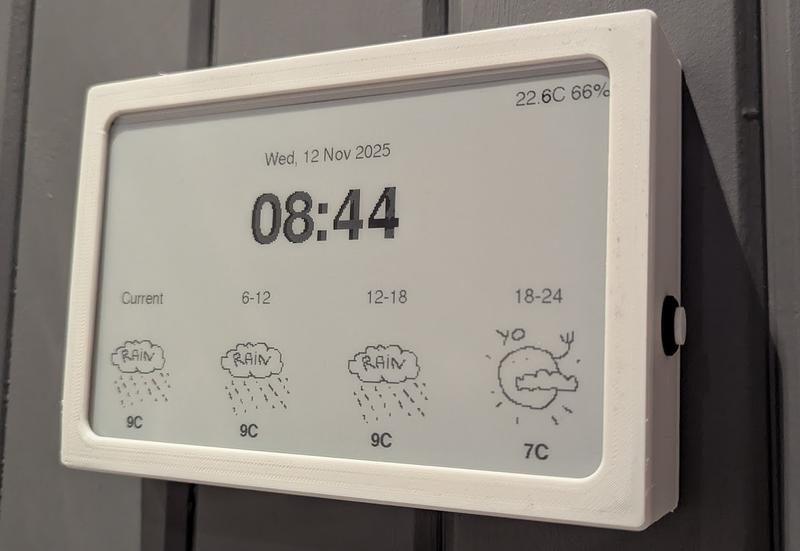
Love those weather icons. Personality in software design is underrated.
Thanks! I intentionaly made the weather symbols somewhat "childlike" to give it some personality and also make it obvious that it's a custom device, and not some off the shelf gadget. Works well as a conversation starter!
OpenMeteo is pretty amazing too, and doesn't require an account or API key, which is nice.
I incorporated OpenMeteo into a project recently and got frustrated with their aggressive rate limiting. If in the US, weather dot gov has an excellent, free API. Or, OpenWeatherAPI which works internationally and has support for more things that weather dot gov does not. OpenWeatherAPI will also synthetically provide weather data based on their models if there is missing station data
> I incorporated OpenMeteo into a project recently and got frustrated with their aggressive rate limiting
Which one? They seem to do 600 calls / min, 5.000 calls / hour, 10.000 calls / day, 300.000 calls / month, how many times do you need to look up the weather for personal use? Fine, maybe you want 3 different locations, you can still call each of those sufficiently with those rate limits, no?
1 reply →
Using your own weather station is another option
I need to know why the opposite of 'rain' is 'yo'.
Seems the sun is the one saying "yo", perhaps as a form of a greeting as it was raining the days before?
I'm just guessing, but I think it might simply just be for fun :)
The sun is greeting you! I drew these freehand, kind of quickly. And while I personally like the style and think it's a good fit for us, I did intend to make several sets of weather icons. At the very least I need to make the sun symbols adapt to the seasons - we don't really have a full sun during the darkest months of the year where I live.
yo it's time to go out!
Nice! Do you think it would be easy for someone with no hardware experience to build one?
Yes, I think so. Electronics prototyping is so accessible now, and there's such a deluge of inspirational projects out there to learn from. YouTube is a gold mine, and I'll leave links to a few channels I follow, below.
If you get an Arduino or Esp32 microcontroller (maybe in one of those starter-kits with various sensors), some breadboards, assorted jumper-cables and a kit with electronic components (resistors, caps) you'll be good to go. A device like a wall clock most likely won't require soldering, since it won't be jostled or moved around much.
Ben Eater: https://www.youtube.com/@BenEater/videos
Paul McWhorter: https://www.youtube.com/@paulmcwhorter/videos
Huy Vector: https://www.youtube.com/@huyvector/videos
I'd also take a look at the other DIY projects that people have linked in this discussion.
If you already have Home Assistant running, I think it should be simple. Most of the time you can buy devices with pins already soldered and it's just the matter of connecting them together. AIs are pretty good with ESPHome configs. You can even take a picture so that they can help you identify the correct pins. Some coding may be required for drawing things on the display though.
hi I've been interested in doing something like this for myself, what tools and software did you use?
+1, and have you tried running 2 displays side by side ? That should give you an effective diagonal of 14 inches or so, and for those displays, cutting it in two does not really affect the utility of the display (likely tabular content anyway).
Seems like the author has experimented with 2 kindles side by side.
I source most of my components from aliexpress. It's been a while, but these are the components I used:
Microcontroller: FireBeetle 2 ESP32
Display: Generic 10" e-Paper display with driver board included
Timekeeping: DS3231 Real Time Clock Module
Temperature and humidity: BME280 module
Charging: Type-C USB 2S Li-ion BMS
That, along with a breadboard, two 18650 batteries, some resistors and capacitors make up the hardware. I modelled and 3D printed the case. I used the PlatformIO plugin (available for VSCode-based IDEs) for programming and transferring code to the esp32.
Weather API: https://openweathermap.org
For actual firmware I'd take a look at matada's github for inspiration (see the other reply in this thread). My own code isn't of the photogenic sort.
I built this weather dashboard specifically for colour EPD https://github.com/mt-empty/pi-inky-weather-epd